Cancellation
The useful path is buried under Workspace, Subscription, and a panel labeled Danger Zone.
Learn moreIndependent cancellation guide
When a company brags about ending creative jobs, sells "unlimited" plans that users say are anything but unlimited, and keeps showing up in scandal after scandal, believe the pattern. Higgsfield is not the future of creativity. It is the warning label.
Six places where users can get caught: cancellation path, refund fine print, card descriptors, and post-cancel charge reports.
Before you chase support, preserve the proof. The report below keeps the path, policy, and user-reported billing issues in one place.
Open the full evidence pageReal-world patterns from the report, grouped so the page scans like the reference layout.
The useful path is buried under Workspace, Subscription, and a panel labeled Danger Zone.
Learn moreThe policy is narrow: initial purchases only, short window, zero credits used, and possible fees.
Learn moreUser reports describe surprise billing, post-cancel charge attempts, and unfamiliar card descriptors.
Learn moreA practical sequence for people trying to cancel, preserve proof, and challenge a charge.
Use the account cancellation flow, then screenshot the confirmation before leaving the page.
Send the account email, charge date, amount, and cancellation proof so there is a written trail.
If the policy blocks a refund or charges continue, start the dispute with your receipt and screenshots.
Use public support channels only after preserving receipts, screenshots, and cancellation records.
The detailed cancellation path, refund rules, card-charge explanation, and source links.
Cancelling Higgsfield is not the problem. Getting refunded is. You can switch off your subscription in a few clicks once you find the button, and finding it is half the complaint. What cancelling won't do is give you money back for the term you already paid, and that's where most people get caught.
This page has the exact cancel path, the refund rules in plain English, and what to do when a charge shows up you didn't authorize. Every claim links to Higgsfield's own terms or a real user report.
Higgsfield's help center lists one path. Users report a different, more buried one that they actually find. Here it is:
Yes, the cancel button lives in a section they named "Danger zone." We didn't write that; they did. One user described the whole hunt as "the exact treasure map to escape their labyrinth," in a thread titled "Impossible to cancel this subscription."
Capture target: thread title "Impossible to cancel this subscription" + the step list ending at "Danger zone – Manage subscription cancellations"
Open public sourceCancelling switches off auto-renewal. Your plan stays active until the end of the paid term, then drops to the free tier. It does not refund the current term. Cancel on day two of an annual plan and you keep access for eleven more months you already paid for, with no money back. (Higgsfield help center.)
Straight from their Terms of Use (§9) and help center:
The binary rule is not theoretical. A user documented a refund refused on an accidental annual purchase with 99% of credits unused. The 1% they'd used was enough to void it.
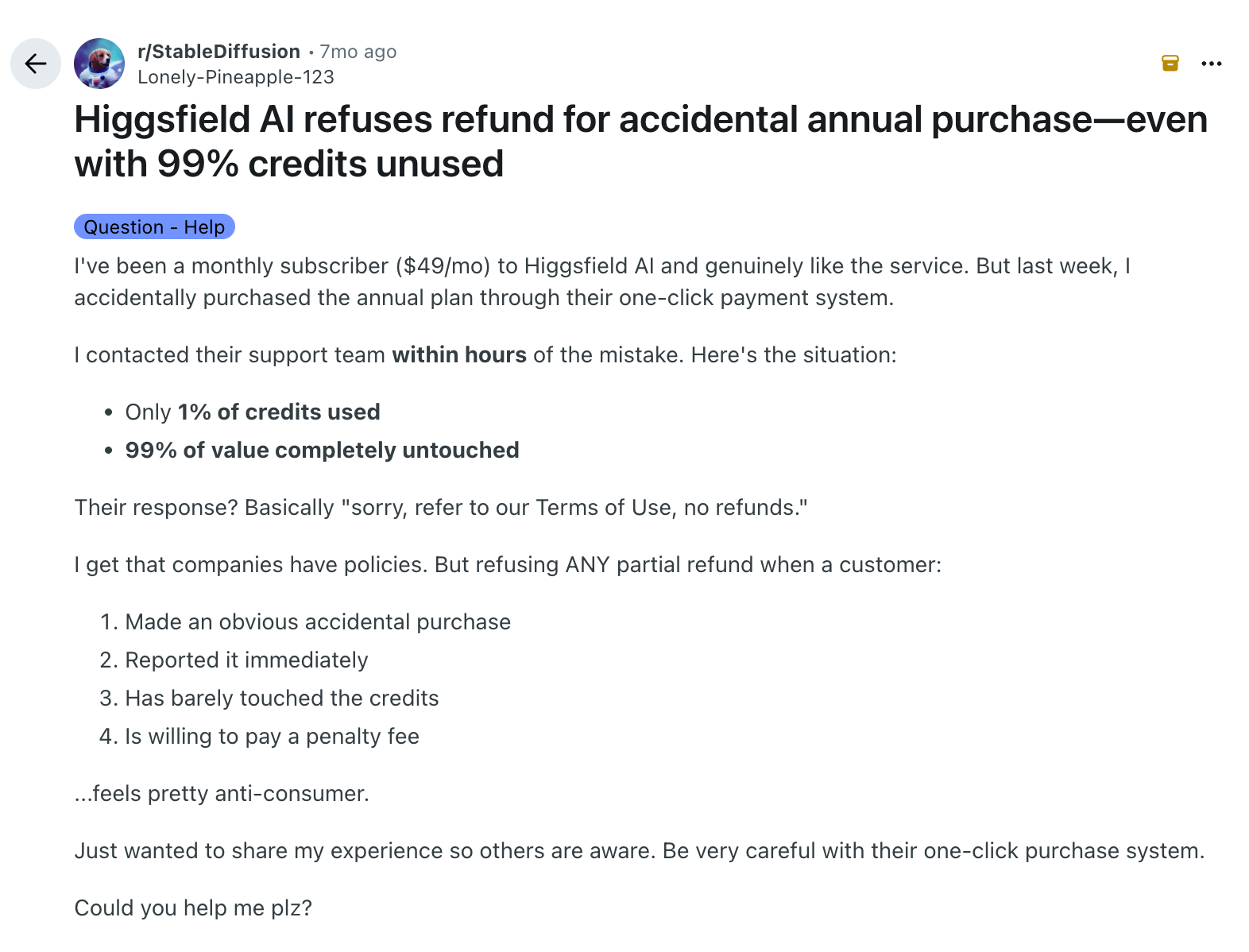
Capture target: title "Higgsfield AI refuses refund for accidental annual purchase —even with 99% credits unused"
Open public sourceThat's Higgsfield. Higgsfield, Inc. is the San Francisco company behind the app; your bank prints the legal entity, not the brand name you signed up under. It's a real, funded company, so an unfamiliar descriptor isn't fraud by itself. Two things usually drive people here:
This is the serious one, and more than one person reports it.
"even after I cancelled they kept trying to charge my card. Still happening actually, got hit with a $70 attempt yesterday. Definitely not a one-off glitch." — r/SaaS, August 2026
Capture target: quote "even after I cancelled they kept trying to charge my card ... got hit with a $70 attempt yesterday. Definitely not a one-off glitch."
Open public sourceHiggsfield's help center says Auto-Refill stops once you cancel. At least one user says otherwise. So: confirm the cancellation saved, screenshot the confirmation, and watch your statement for a full cycle.
The honest summary: cancelling works once you find the buried button. Refunds almost never do, the policy is narrow by design, and multiple users report charges continuing anyway. Treat a card dispute as your real recourse.